
文章目录
- 一、基本介绍
- 二、常用方法
- 2.1 FileChannel 类
- 三、应用案例
- 3.1 本地文件写数据
- 3.2 本地文件读数据
- 3.3 使用一个 Buffer 完成文件读取
- 3.4 使用transferFrom拷贝文件
一、基本介绍
1)、NIO 的通道类似于流,但有些区别如下:
- 通道可以同时进行读写,而流只能读或者只能写
- 通道可以实现异步读写数据
- 通道可以从缓冲读数据,也可以写数据到缓冲
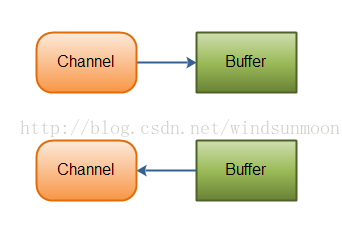 2)、BIO 中的 stream 是单向的,例如 FileInputStream 对象只能进行读取数据的操作,而 NIO 中的通道(Channel)是双向的,可以读操作,也可以写操作。
3)、Channel 在 NIO 中是一个接口
public interface Channel extends Closeable
4)、常用的 Channel 类有:FileChannel、DatagramChannel、ServerSocketChannel 和 SocketChannel
5)、FileChannel 用于文件的数据读写,DatagramChannel 用于 UDP 的数据读写,ServerSocketChannel 和 SocketChannel 用于 TCP 的数据读写。
二、常用方法
2.1 FileChannel 类
FileChannel 主要用来对本地文件进行 IO 操作,常见的方法有:
| 方法 | 描述 |
|---|---|
| int read(ByteBuffer dst) | 从通道读取数据并放到缓冲区中 |
| int write(ByteBuffer src) | 把缓冲区的数据写到通道中 |
| long transferFrom(ReadableByteChannel src, long position, long count) | 从目标通道中复制数据到当前通道 |
| long transferTo(long position, long count, WritableByteChannel target) | 把数据从当前通道复制给目标通道 |
三、应用案例
3.1 本地文件写数据
案例要求
1)、使用 ByteBuffer(缓冲)和 FileChannel(通道),将"Hello,World!",写入到 file01.txt 中
2)、文件不存在就创建
3)、代码演示
public class NIOFileChannel01 {

    public static void main(String[] args) throws IOException {

        String str = "Hello,World!";

        // 创建一个输出流->channel
        FileOutputStream fileOutputStream = new FileOutputStream("d:\\file01.txt");

        // 通过 fileOutputStream 获取对应的 FileChannel
        // 这个 fileChannel 真实类型是 FileChannelImpl
        FileChannel fileChannel = fileOutputStream.getChannel();

        // 创建一个缓冲区 ByteBuffer
        ByteBuffer byteBuffer = ByteBuffer.allocate(1024);

        // 将 str 放入到 byteBuffer
        byteBuffer.put(str.getBytes());

        // 对 byteBuffer 进行反转(flip)
        byteBuffer.flip();

        // 将 byteBuffer 数据写入到 fileChannel
        fileChannel.write(byteBuffer);
        fileOutputStream.close();
    }

}
3.2 本地文件读数据
案例要求
1)、使用 ByteBuffer(缓冲)和 Channel(通道),将 file01.txt 中的数据读入到程序,并显示在控制台
2)、假定文件已经存在
3)、代码演示
public class NIOFileChannel02 {

    public static void main(String[] args) throws IOException {

        // 创建文件的输入流
        File file = new File("d:\\file01.txt");
        FileInputStream fileInputStream = new FileInputStream(file);

        // 通过 fileInputStream 获取对应的 FileChannel->FileChannelImpl
        FileChannel fileChannel = fileInputStream.getChannel();

        // 创建缓冲区
        ByteBuffer byteBuffer = ByteBuffer.allocate((int)file.length());

        // 将通道的数据读入到 byteBuffer 中
        fileChannel.read(byteBuffer);

        // 将 byteBuffer 中的字节数据转成字符串
        System.out.println(new String(byteBuffer.array()));

        fileInputStream.close();
    }

}
3.3 使用一个 Buffer 完成文件读取
案例要求
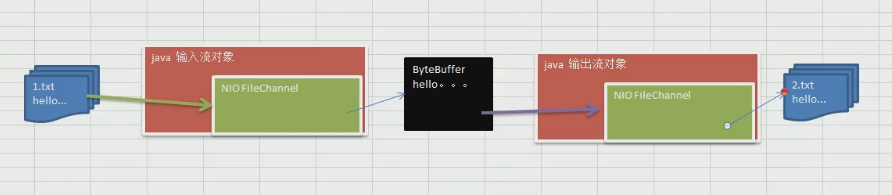
1)、使用 FileChannel(通道)和 方法 read、write,完成文件的拷贝
2)、拷贝一个文本文件 1.txt,放在项目下即可 2.txt
3)、全程只使用一个 Buffer
4)、代码演示
public class NIOFileChannel03 {

    public static void main(String[] args) throws IOException {

        FileInputStream fileInputStream = new FileInputStream("1.txt");
        FileChannel fileChannel01 = fileInputStream.getChannel();

        FileOutputStream fileOutputStream = new FileOutputStream("2.txt");
        FileChannel fileChannel02 = fileOutputStream.getChannel();

        ByteBuffer byteBuffer = ByteBuffer.allocate(512);

        while (true){ // 循环读取

            // 这里有一个重要的操作,一定不要忘了
            /*public final Buffer clear() {
                position = 0;
                limit = capacity;
                mark = -1;
                return this;
            }*/
            byteBuffer.clear(); // 清空 buffer

            int read = fileChannel01.read(byteBuffer);
            System.out.println("read =" + read);
            System.out.println(new String(byteBuffer.array()));

            if(read == -1){ // 表示读取完毕
                break;
            }

            // 将 buffer 中的数据写入到 fileChannel02 --> 2.txt
            byteBuffer.flip();
            fileChannel02.write(byteBuffer);
        }

        // 关闭流
        fileInputStream.close();
        fileOutputStream.close();
    }

}
3.4 使用transferFrom拷贝文件
案例要求
1)、使用 FileChannel(通道)和 方法 transferFrom,完成文件的拷贝
2)、拷贝一张图片
3)、代码演示
public class NIOFileChannel04 {

    public static void main(String[] args) throws IOException {

        // 创建相关流
        FileInputStream fileInputStream = new FileInputStream("d:\\a.jpg");
        FileOutputStream fileOutputStream = new FileOutputStream("d:\\a2.jpg");

        // 获取各个流对应的filechannel
        FileChannel sourceCh = fileInputStream.getChannel();
        FileChannel destCh = fileOutputStream.getChannel();

        // 使用 transferFrom 完成拷贝
        destCh.transferFrom(sourceCh,0,sourceCh.size());

        // 关闭通道和流
        sourceCh.close();
        destCh.close();
        fileInputStream.close();
        fileOutputStream.close();
    }

}
版权声明:本文不是「本站」原创文章,版权归原作者所有 | 原文地址: