
ElasticSearch7.3学习(八)—-倒排索引揭秘及初识分词器(Analyzer)
一、倒排索引
1. 构建倒排索引
例如说有下面两个句子doc1,doc2
doc1:I really liked my small dogs, and I think my mom also liked them.
doc2:He never liked any dogs, so I hope that my mom will not expect me to liked him.
首先进行英文分词,这个阶段就是初步的倒排索引的建立
| term | doc1 | doc2 |
|---|---|---|
| I | * | * |
| really | * | |
| liked | * | * |
| my | * | * |
| small | * | |
| dogs | * | |
| and | * | |
| think | * | |
| mom | * | * |
| also | * | |
| them | * | |
| He | * | |
| never | * | |
| any | * | |
| so | * | |
| hope | * | |
| that | * | |
| will | * | |
| not | * | |
| expect | * | |
| me | * | |
| to | * | |
| him | * |
接下来就是搜索,假如说搜索为关键词为"mother like little dog",把关键词分词为mother like little dog四个词进行搜索,会发现搜不出来结果。这不是我们想要的结果。但是对于mom来说,它与mother互为同义词。在我们人类看来这两个词代表的意思就是一样。所以能想到的操作就是能不能让这两个词代表的含义一样呢?这就是对词语进行标准化操作了。
2. 重建倒排索引
normalization正规化,建立倒排索引的时候,会执行一个操作,也就是说对拆分出的各个单词进行相应的处理,以提升后面搜索的时候能够搜索到相关联的文档的概率。比如说时态的转换,单复数的转换,同义词的转换,大小写的转换等
mom ―> mother
liked ―> like
small ―> little
dogs ―> dog
重新建立倒排索引,加入normalization,重建后的倒排索引如下
| word | doc1 | doc2 | normalization |
|---|---|---|---|
| I | * | * | |
| really | * | ||
| like | * | * | liked ―> like |
| my | * | * | |
| little | * | small ―> little | |
| dog | * | dogs ―> dog | |
| and | * | ||
| think | * | ||
| mother | * | * | mom ―> mother |
| also | * | ||
| them | * | ||
| He | * | ||
| never | * | ||
| any | * | ||
| so | * | ||
| hope | * | ||
| that | * | ||
| will | * | ||
| not | * | ||
| expect | * | ||
| me | * | ||
| to | * | ||
| him | * |
3. 重新搜索
再次用mother liked little dog搜索,就可以搜索到了。对搜索条件经行分词 normalization
mother -》mom
liked -》like
little -》small
dog -》dogs
这样的话doc1和doc2都会搜索出来
二、分词器 analyzer
1. 什么是分词器 analyzer
作用:简单来说就是切分词语。给你一段句子,然后将这段句子拆分成一个一个的单个的单词,同时对每个单词进行normalization(时态转换,单复数转换)
normalization的好处就是提升召回率(recall)
recall:搜索的时候,增加能够搜索到的结果的数量
analyzer 组成部分:
1、 characterfilter:在一段文本进行分词之前,先进行预处理,比如说最常见的就是,过滤html标签(hello–>hello),&–>and(I&you–>Iandyou);
2、 tokenizer:分词,helloyouandme–>hello,you,and,me;
3、 tokenfilter:lowercase(小写转换),stopword(去除停用词),synonym(同义词处理),例如:dogs–>dog,liked–>like,Tom–>tom,a/the/an–>干掉,mother–>mom,small–>little;
一个分词器,很重要,将一段文本进行各种处理,最后处理好的结果才会拿去建立倒排索引。
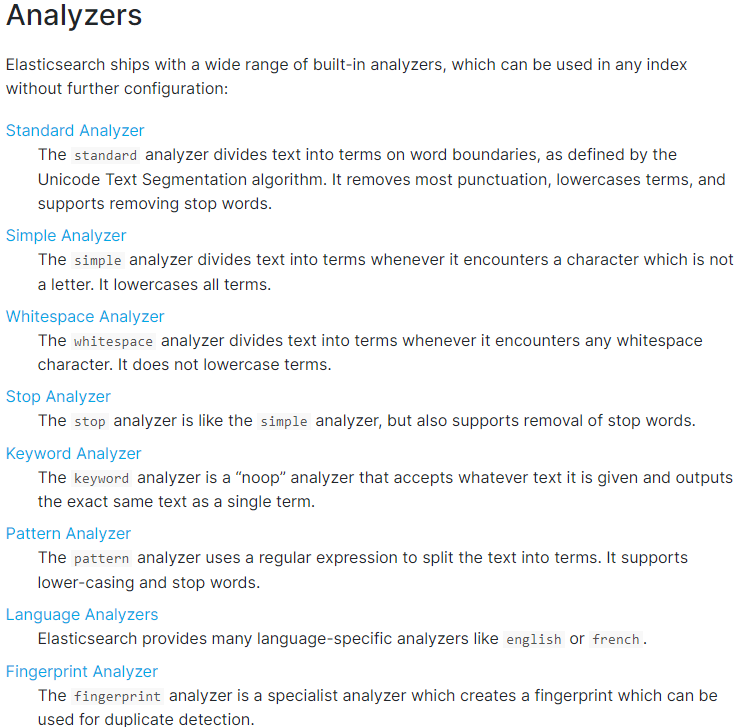
2. 内置分词器的介绍
例句:Set the shape to semi-transparent by calling set_trans(5)
standard analyzer标准分词器:set, the, shape, to, semi, transparent, by, calling, set_trans, 5(默认的是standard)
simple analyzer简单分词器:set, the, shape, to, semi, transparent, by, calling, set, trans
whitespace analyzer:Set, the, shape, to, semi-transparent, by, calling, set_trans(5)
language analyzer(特定的语言的分词器,比如说,english,英语分词器):set, shape, semi, transpar, call, set_tran, 5
官方文档:https://www.elastic.co/guide/en/elasticsearch/reference/7.4/analysis-analyzers.html
三、测试分词器
GET /_analyze
{
  "analyzer": "standard",
  "text": "Text to analyze 80"
}
返回值:
{
  "tokens" : [
    {
      "token" : "text",
      "start_offset" : 0,
      "end_offset" : 4,
      "type" : "<ALPHANUM>",
      "position" : 0
    },
    {
      "token" : "to",
      "start_offset" : 5,
      "end_offset" : 7,
      "type" : "<ALPHANUM>",
      "position" : 1
    },
    {
      "token" : "analyze",
      "start_offset" : 8,
      "end_offset" : 15,
      "type" : "<ALPHANUM>",
      "position" : 2
    },
    {
      "token" : "80",
      "start_offset" : 16,
      "end_offset" : 18,
      "type" : "<NUM>",
      "position" : 3
    }
  ]
}
token:实际存储的term 关键字
position:在此词条在原文本中的位置
start_offset/end_offset:字符在原始字符串中的位置
本文来自博客园,作者:|旧市拾荒|,转载请注明原文链接:https://www.cnblogs.com/xiaoyh/p/16006255.html
posted @ 2022-03-18 23:19 |旧市拾荒| 阅读( 388) 评论( 0) 编辑 收藏 举报
版权声明:本文不是「本站」原创文章,版权归原作者所有 | 原文地址: